Pure Writer
Write fast. Keep every word.
A fast plain text editor you can trust, with History, cloud sync and backups, layers of protection against losing your work, and many thoughtful writing aids. For Android, iPhone, and iPad.
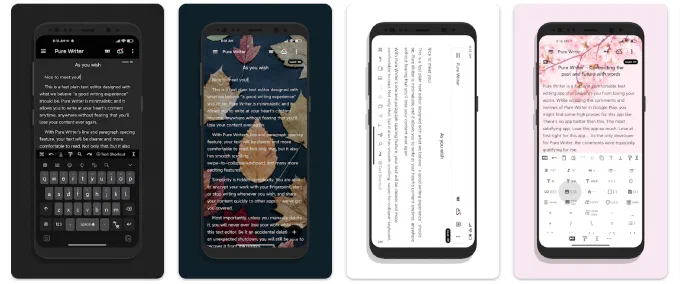
Writing connects us with the past and lets us imagine the future. Yet many writing apps get in the way: they launch too slowly and the idea slips away, they fail and your words are gone, or they lack the features and small aids that writing needs.
Pure Writer solves these problems. It is a very fast plain text editor, built so writing can go back to what it was meant to be: pure, safe, always ready, never losing your words, and a pleasure to do.
Peace of Mind
The Pure Writer icon is the silhouette of a time machine: words can carry us across time, and the app keeps History and automatic backups for you. Even if you delete something by mistake, or your phone loses power without warning, your document is still saved in full, or waiting for you in History. For years, Pure Writer has strived never to lose a word, offering a writing experience people trust.
Smooth and Fluid
Beyond keeping your words safe, Pure Writer is a pleasure to look at and to use. You can slide the keyboard up and down with your finger, and the cursor breathes, fading gently in and out instead of simply blinking. We have polished many details like these. Writing aids step in just when you need them: an empty pair of quotes or brackets disappears with a single backspace, and when you finish a line of dialogue, pressing Return takes you past the closing quote. Small touches like these keep your writing flowing.
Rich, Yet Simple
Everything you expect from an editor is here: a shortcut bar, cloud sync across devices, first-line indents, paragraph spacing, beautiful long images, undo, word count, Dual Editors, One-Tap Typesetting, find and replace, Markdown, and a desktop version. There are creative touches too: Pure Writer can read aloud the words you just typed, so you can check your writing with your ears. And there is no word limit beyond what your device can handle. Through it all, the design stays simple: Material Design on Android, and Apple's design language on iOS.
Open the app and start writing in an instant; stop anywhere and pick up where you left off. A writing experience that feels safe and runs smooth. This is Pure Writer. Enjoy your writing.
Your Words Stay Yours
Pure Writer is a text editor for writing and organizing your own text. It does not offer books, magazines, or other reading content, and it has no community, feed, or publishing platform. What you write is never made public or shown to anyone else. Your documents are stored on your device, backups and sync go only to your own iCloud or cloud drive, and our servers do not store your writing.
Pure Writer for iOS
Pure Writer for iOS draws on ten years of building editors. It is rebuilt from the ground up around native iOS design and interactions, with Liquid Glass throughout. Typewriter Mode keeps the paragraph you are writing in focus while the rest softly fades, and reopening a document brings you right back to where you left off. The iOS version includes 217 carefully crafted features and details.
- For iPhone and iPad with iOS 26 or iPadOS 26 or later.
- Try every feature free for 7 days. No subscription is needed during the trial, and you will not be charged automatically. Afterwards, choose a monthly subscription, a yearly subscription, or a lifetime membership. There are no separate free and premium tiers: membership unlocks everything.
- Memberships purchased through Google Play are managed by your Google account and cannot be transferred to iOS.
- Connect the same cloud drive account on Android, iOS, and desktop to sync and keep writing across your devices.
Features at a Glance
Editing That Flows
- Blue Fill Box: type inside paired symbols, then press Return to jump past them
- Symbol pairs delete together; lists and numbering continue, and indents follow the previous paragraph
- Undo and redo, with keyboard shortcuts
- One undo history for title and body, with three-finger gestures and shake to undoiOS
- Move paragraphs up and down, one or several at a time
- Date completion
- Dual Editors: keep your draft and your reference material side by side
- No word limit, from a single line to a long manuscript
Focused Writing
- Typewriter Mode; the top bar hides as you scroll
- Immersive Mode tucks the top bar away as you start typingiOS
- Keep the screen on, dismiss the keyboard with your finger, and return to your last scroll position
- Comfortable line lengths on wide screens and in landscape
Layout & Word Count
- Floating word count, a separate count for the selection, and the count before the cursor
- Choose how words are counted: with or without punctuation, spaces, and line breaks
- Line spacing, margins, paragraph spacing, and font size, with a live preview as you drag
- One-Tap Typesetting tidies blank lines and first-line indents
- Keep or remove blank lines when pasting multiple lines
Details That Delight
- Light and Dark appearance; custom accent coloriOS
- Import your own TTF or OTF fonts
- Paper backgrounds: solid colors, built-in scenery, or your own photos; frame a photo with two fingers and adjust its maskiOS
- Manuscript ruling lines, solid or dashed, with adjustable opacity and position
- Rounded, refined selection highlightsiOS; multi-line Fill Boxes merge into one smooth outline
- A sidebar with three widths, with corners that match the screeniOS
Quick Input
- A shortcut bar above the keyboard for phrases, character names, and symbols
- Choose where the cursor lands after inserting, with date and time templates
- A multi-row shortcut bar, with each row scrolling on its own
- Actions in the bar too: undo, redo, indent, typesetting, search, and moving the cursor
Organize Your Writing
- Organize your own writing in nested groups, from quick notes to long drafts
- Tags and tag filters; one or two columns in the list
- Drag to reorder; collapsible groups with sticky headers
- A detailed list with summaries, times, and word counts; jump to the current document
- Duplicate documents; move documents and whole groups
Find & Replace
- Find and replace in the title and body, or use the classic find mode
- Search across all your documents, on several conditions, group names included
- Match case, regular expressions, and sortable results
- Replace across documents after seeing how many matches are involved
Saving & Recovery
- Autosave and History, with version comparison and a preview before restoring
- Writing Cache: one more way to recover text, beyond History
- Trash: restore deleted documents
- Automatic and manual local backups, which you can also save elsewhere
- A safety backup of your current data before every restore; a clear backup protection statusiOS
- A warning when storage runs low
Cloud Backup & Continuity
- Extra iCloud backups: after switching phones or reinstalling, restore from a backup the app findsiOS
- Automatic backups to Dropbox or OneDrive, optionally on Wi‑Fi only (Android also supports WebDAV)
- Cloud sync across devices: connect the same cloud drive account and keep writing on Android, iOS, and desktop
Markdown
- Switch any document between plain text and Markdown
- Syntax highlighting as you write, with clear headings, emphasis, code, quotes, and linksiOS
- A Markdown panel to insert headings, lists, quotes, code, links, and tables
- Keyboard shortcuts for bold, italic, and linksiOS
- LaTeX math and images
- Save as a .md file, keeping the Markdown source
Preview & Export
- A full-screen preview of the finished look, with several preview and export themes
- Export as a long image, image sets, PDF, Word (DOCX), EPUB, or plain text
- Export only the selection; add a custom watermark or an EPUB author name
- Combine documents into one export: EPUB with chapter navigation and a title page, Word with an outline
Proofread by Ear
- Read the document aloud, highlighting the current sentence, starting from the cursor
- Several reading speeds; keeps reading in the background and on the lock screen, with headphone controls
- Hear the words or sentence you just typed, and check your writing with your ears
Language & Accessibility
- Choose a language just for this app, separate from your system language
- Screen reader support: VoiceOver on iOS, TalkBack on Android
Features marked iOS are currently available only in the iOS version.
Download
Android
iPhone and iPad
- App Store: https://apps.apple.com/app/id6803257195
Desktop
Pure Writer Desktop (free for now) syncs with your phone through the same cloud drive account.
More
Help
If you run into a problem or have a suggestion, email us at writer@drakeet.com.
If you enjoy Pure Writer, please share this page with others. Your support helps Pure Writer keep getting better. Thank you!