
Pure Writer for iOS
For iPhone and iPad · Free 7-day trial
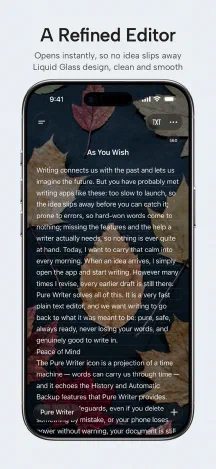
Pure Writer for iOS draws on ten years of building editors. It is rebuilt from the ground up around native iOS design and interactions, with Liquid Glass throughout. The fast writing app that strives never to lose a word is now available on iPhone and iPad.
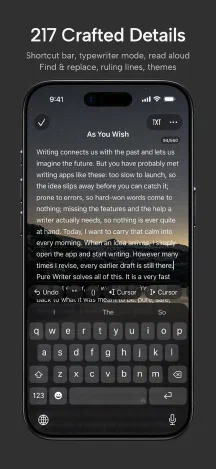
Rebuilt for iPhone and iPad
Slide the keyboard up and down with your finger. Typewriter Mode keeps the paragraph you are writing in focus while the rest softly fades, and reopening a document brings you right back to where you left off. The iOS version includes 217 carefully crafted features and details, and some of them are currently available only on iOS:
- Immersive Mode tucks the top bar away as you start typing
- One undo history for title and body, with three-finger gestures and shake to undo
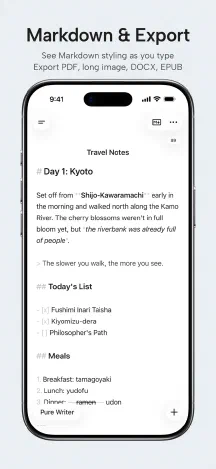
- Markdown syntax highlighting as you write, and keyboard shortcuts for bold, italic, and links
- Custom accent color; your own photos as paper backgrounds, framed with two fingers, with an adjustable mask
- Rounded, refined selection highlights; a sidebar with three widths, with corners that match the screen
See the full list in Features at a Glance on the home page.
Peace of Mind
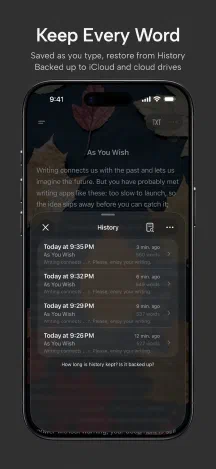
For years, Pure Writer has strived never to lose a word. The iOS version protects your writing in several ways:
- Autosave and History, with version comparison and a preview before restoring
- Writing Cache and Trash: more ways to recover text, beyond History
- Automatic local backups, a safety backup of your current data before every restore, and a clear backup protection status
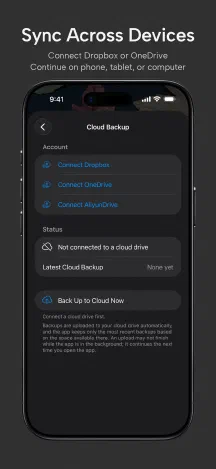
- Extra iCloud backups: after switching phones or reinstalling, restore from a backup the app finds
- Automatic backups to Dropbox, OneDrive, or AliyunDrive, optionally on Wi‑Fi only
Pure Writer is a text editor for writing and organizing your own text. Your documents are stored on your device, backups and sync go only to your own iCloud or cloud drive, and our servers do not store your writing.
Sync with Android and Desktop
Connect the same cloud drive account on iOS, Android, and desktop (Windows and macOS) to sync and keep writing across your devices. To set it up, see the Automatic and Cloud Backup Tutorial.
System Requirements, Trial, and Membership
- For iPhone and iPad with iOS 26 or iPadOS 26 or later.
- Try every feature free for 7 days. No subscription is needed during the trial, and you will not be charged automatically.
- After the trial, choose a monthly subscription, a yearly subscription, or a lifetime membership. There are no separate free and premium tiers: membership unlocks everything.
- If you choose not to pay after the trial, you can still export all your writing in one tap, and apart from editing and creating documents, many features such as reading, backup, and sync stay available.
Frequently Asked Questions
Is there a Pure Writer app for iPhone?
Yes. Pure Writer for iOS is available on the App Store for iPhone and iPad. Search for “Pure Writer” on the App Store, or use the download button at the top of this page.
Does it work on iPad?
Yes. The same app works on both iPhone and iPad. It keeps comfortable line lengths on wide screens and in landscape, and supports keyboard shortcuts on an external keyboard.
Can I use my Android membership on iOS?
Memberships purchased through Google Play are managed by your Google account and cannot be transferred to iOS.
Why can’t I transfer a membership purchased through Google Play to iOS?
Making Google Play and iOS purchases work together runs into several problems that are hard to solve:
- It would require everyone to register an account. Paying on Google Play or the App Store doesn’t require registering an account, and Pure Writer has always kept it that way. Writing is deeply personal. Many people don’t want to hand over personal information for this, remember yet another account and password, or deal with changing email addresses and forgotten passwords later. For most people, it simply isn’t necessary.
- Subscription states are extremely complex and hard to keep in sync. Both stores offer subscriptions, and a subscription’s state keeps changing: renewals, cancellations, grace periods after failed payments, refunds, switches between billing periods, and more. Every change would have to be picked up promptly from both Google and Apple, synced to the account, and then granted or revoked on the other side. If any step goes wrong, a paid subscription could be treated as expired, or someone who canceled could keep using Pro. Doing this would require an extremely complex system for syncing and reconciling purchases, with enormous development, maintenance, and management costs.
- Redeem codes can’t be revoked and are easy to abuse. On Google Play, some people got Pro through redeem codes. These codes are managed by Google: we can’t revoke or reclaim them, or move them to an account. If Google Play Pro could be linked to an account, a single purchase could be linked to one account after another, or even shared with and resold to many people, and we would have no way to stop it.
- With many states running in parallel, the complexity multiplies. Because many people don’t want to register an account, even with cross-platform support we would have to maintain two systems at once, one with accounts and one without. Layer on multiple sources and states such as subscriptions, one-time purchases, and redeem codes, and the complexity multiplies. There are also many smaller edge cases that are hard to solve for good: how a refund on one side should take effect on the other; the two stores being unable to verify each other’s purchases; accounts being shared or resold; how to confirm status after switching devices or while offline. Each one can be exploited, and each needs extra safeguards and long-term maintenance.
Products that share purchases across platforms almost always require an account first. It’s not just Pure Writer: in many other products that don’t require an account, purchases on each platform are usually separate too. It’s not that we don’t want to; the complexity and risks really are too great. Thank you for your understanding and support!
How is the iOS version different from the Android version?
Both strive never to lose a word, and your documents can sync between them through a cloud drive. Each follows the design language of its own platform: Apple’s design language on iOS, and Material Design on Android. Their features differ in places: items marked iOS in Features at a Glance on the home page are currently available only in the iOS version.
What should I do if I run into a problem?
See Pure Writer for iOS Support and the Pure Writer User Manual, or email writer@drakeet.com.